Description
LMX100™ GPR
Ground Penetrating Radar (GPR)
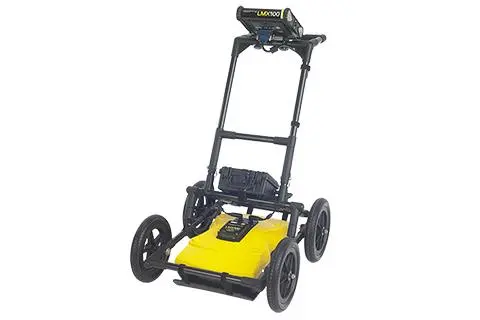
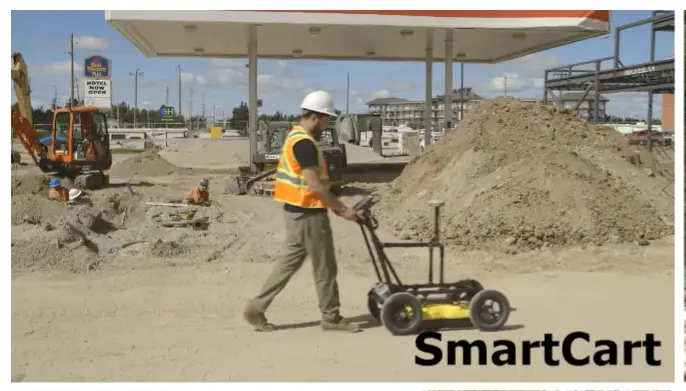
Our Sensors & Software LMX100™ completes the locator’s toolbox, offering a more complete picture of the underground infrastructure. With a simple, easy-to-use interface it also offers the perfect balance of depth penetration and high resolution for accurate locating.
LMX has the advantage of detecting:
- Metallic and non-metallic utilities
- Utilities with broken tracer wires
- Undocumented utilities
- Trenches and disturbed soil often associated with utility burial
- Unexpected obstacles or buried structures such as old foundations that can cause problems for excavations or construction
Features
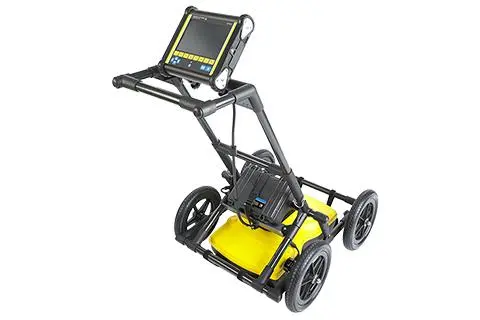
High visibility touch screen
A resistive touch screen that works with gloves on, with user selectable languages and metric and US standard options.
Produce and share instant on-site reports
Share directly from your display unit with built-in Wi-Fi. Option to add data markers to highlight points of interest.
Lightweight build
A lightweight fiberglass cart frame build making transportation easy. No metal in the build reduces interference with GPR signals.
GPR Sensor
Patented ultra-wideband (UWB) 250 MHz GPR antenna and DynaT for dynamic target enhancement.
USB port
A USB port allowing for easy data transfer for further data analysis.
Lead acid gel battery
A long lasting and swappable batter
Comparison
Line Scan Mode |
|||||
| Features | Description | Demo | LMX100™ | LMX150™ FINDAR | LMX200™ |
|---|---|---|---|---|---|
| Real time Locate & Mark™ | Acquire data along a line and view it as a cross-section image | ✓ | ✓ | ✓ | |
| Line Data playback | Save and view any collected line data | ✕ | ✓ | ✓ | |
| Back-up indicator | After acquiring some data on the screen, pull the system backwards to pinpoint target location | ✓ | ✓ | ✓ | |
| Position & Depth Indicator | Crosshair on back-up indicator shows current position and depth | ✓ | ✓ | ✓ | |
| Pop up info box | Touch and hold the screen to generate a movable depth and position info box | ✓ | ✓ | ✓ | |
| Pause Button | In No Save Mode, temporarily stop data collection and resume again without clearing the data from the screen | ✓ | ✓ | ✓ | |
| Drawing arrows | In No Save Mode, draw arrows on the screen to highlight features | ✓ | ✓ | ✓ | |
| GPS Status indicator | Indicates the signal quality of the selected GPS (internal or external) | ✕ | ✓ | ✓ | |
| SplitView | During data collection, display LineView and MapView simultaneously to quickly see the positional relationship between targets (external GPS only) | ✕ | ✓ | ✓ | |
Real time viewing options in Line Scan |
|||||
| Features | Description | Demo | LMX100™ | LMX150™ FINDAR | LMX200™ |
|---|---|---|---|---|---|
| Zoom – Position | Vary the length of data displayed on the screen | ✓ | ✓ | ✓ | |
| Zoom – Depth | Vary the depth of data displayed on the screen | ✓ | ✓ | ✓ | |
| Color | View data with different color palettes | ✓ | ✓ | ✓ | |
| Filter | Filter out flat-lying responses in the data using 5 preset filter levels | ✓ | ✓ | ✓ | |
| Gain | Adjust amplification of GPR data to make weaker or deeper targets visible | ✓ | ✓ | ✓ | |
| Soil Cal | Calibrate velocity for accurate depth measurements; hyperbola-fitting method or select from available pre-set Soil Cal values | ✓ | ✓ | ✓ | |
| Interpretations | Mark subsurface features as a colored dot by touching anywhere on the screen | ✕ | ✓ | ✓ | |
| Flags | Mark noteworthy above-ground features with sequentially numbered flags | ✓ | ✓ | ✓ | |
Grid Scan Mode |
|||||
| Features | Description | Demo | LMX100™ | LMX150™ FINDAR | LMX200™ |
|---|---|---|---|---|---|
| On site grid scan | Collect grid data and generate depth slices in the field | ✕ | ✓ | ✓ | |
| Guided grid setup | Select grid size and resolution | ✕ | ✓ | ✓ | |
| Guided data collection on the Display unit | Guides user through data collection with intuitive visual and audio prompts. | ✕ | ✓ | ✓ | |
| Recollect grid lines | Recollect any grid line if you make a mistake | ✕ | ✓ | ✓ | |
| Collect partial grid lines | Stop any grid line early to avoid an obstacle | ✕ | ✓ | ✓ | |
| Skip grid lines | Skip a grid line with a touch of a button if the line does not need to be collected | ✕ | ✓ | ✓ | |
| Obstacle Avoidance | The system guides you through collecting a grid around an obstacle | ✕ | ✓ | ✓ | |
| Depth slices from incomplete grids | Generate depth slices with an incomplete grid | ✕ | ✓ | ✓ | |
| Grid line playback | View previously collected grid lines | ✕ | ✓ | ✓ | |
SliceView |
|||||
| Features | Description | Demo | LMX100™ | LMX150™ FINDAR | LMX200™ |
|---|---|---|---|---|---|
| View depth slices | Scroll through depths and adjust viewing options | ✕ | ✓ | ✓ | |
| Correlate depth slices to grid lines | View the grid line corresponding to a feature in a depth slice | ✕ | ✓ | ✓ | |
| Depth slice Indicator | Display any grid line and scroll down through the depth slices with the depth slice range indicated on the grid line. | ✕ | ✓ | ✓ | |
| LineView Mode | View grid line in LineView to add interpretations and adjust viewing options | ✕ | ✓ | ✓ | |
Additional Features |
|||||
| Features | Description | Demo | LMX100™ | LMX150™ FINDAR | LMX200™ |
|---|---|---|---|---|---|
| MapView | Graphically view the path travelled by the system, any flags or interpretations added as well as the ability to cycle through processed depth slices (External GPS only) | ✕ | ✓ | ✓ | |
| MapView (Internal GPS) | Graphically show collected grid locations and processed depth slices | ✕ | ✓ | ✓ | |
| External GPS port | Option to connect an external GPS for increased positional accuracy | ✕ | ✓ | ✓ | |
| Screenshots | Saves the current screen image to a JPG file | ✓ | ✓ | ✓ | |
| DynaQ | Dynamic Quality Enhancement – Automatically adjusts data quality based on system speed | ✓ | ✓ | ✓ | |
| DynaT | Dynamic Target Enhancement – allows the user to selectively view small, medium or large subsurface targets for easier viewing and detection | ✓ | ✓ | ✓ | |
| File Management | Data is logically organized for review and transfer | ✓ Screenshots |
✓ Projects containing Lines, Grids & Screenshots |
✓ Projects containing Lines, Grids & Screenshots |
|
Data Export |
|||||
| Features | Description | Demo | LMX100™ | LMX150™ FINDAR | LMX200™ |
|---|---|---|---|---|---|
| USB data transfer | One click data export to a USB drive | ✓ | ✓ | ✓ | |
| Field Interpretations file (.CSV) | Positional information for interpretations and flags automatically exported as a .CSV file | ✕ | ✓ | ✓ | |
| Geotagged Screenshots (.JPG) | Exports screenshots as JPG files | ✓ | ✓ | ✓ | |
| KMZ Files | Screenshots, survey paths and field interpretations are automatically exported to .KMZ files for viewing in Google Earth™ | ✓ Screenshots Only |
✓ | ✓ | |
| Project files (.GPZ) | All data (lines, grids & screenshots) in a project are saved as a .GPZ file | ✕ | ✓ | ✓ | |
| Wi-Fi Mini Reports | From the field, email reports containing screenshots and information about the collected data | ✓ | ✓ | ✓ | |
| System usage report | A PDF report containing usage statistics and system diagnostics | ✓ | ✓ | ✓ | |
GPR Analysis and Reporting Software |
|||||
| Features | Description | Demo | LMX100™ | LMX150™ FINDAR | LMX200™ |
|---|---|---|---|---|---|
| GPR Data Export to optional EKKO_Project™ Core | Open project files to organize data files, view data and generate reports | ✕ | ✓ | ✓ | |
| EKKO_Project™ GPR Software Bundles | Software bundles for added data processing, analysis and visualization | ✕ | ✓ | ✓ | |
GPR System Specifications |
|||||
| Features | Description | Demo | LMX100™ | LMX150™ FINDAR | LMX200™ |
|---|---|---|---|---|---|
| Center Frequency (MHz) | Center frequency of GPR system | 250 | 500 | 250 | |
| Weight | Lightweight GPR system | 22 kg (48 lb) | 19 kg (41lb) | 22 kg (48 lb) | |
| System Size | Compact GPR Cart | 100 x 70 x 115 cm (39.4 x 27.6 x 45.3 in) |
115 × 55 × 90 cm (45 × 21 × 35 in) |
100 x 70 x 115 cm (39.4 x 27.6 x 45.3 in) |
|
| Max Depth | Maximum depth of data collected and displayed on the display unit | 8 m (26 ft) | 3 m (10 ft) | 8 m (26 ft) | |
Downloads
LMX100 Brochure
LMX100 User Guide
LMX100 Accessories Brochure
Explore more from our collection.
Reviews
There are no reviews yet.